

How to Automate Signed Digital Forms into Service Desk Tickets with LiveForms & Power Automate
When managing enterprise IT service desks, student services, or administrative support queues, getting an officially signed document attached to the right ticket is often a painful bottleneck.
Whether it’s an authorization request, an equipment sign-off, or an administrative approval, traditional workflows force users to:
- Download a PDF.
- Sign it externally or on paper.
- Manually upload it back into the ticket system.
This manual handling slows down resolution times, introduces human error, and leaves support teams chasing down missing files.
Recently, one of our clients solved this problem completely using dbs LiveForms™ and Microsoft Power Automate to build a zero-touch pipeline into their InvGate Service Management.
Here is how the solution works and how you can replicate this architecture for your organization.
The Challenge: Disconnected Signatures & Ticket Bottlenecks
Handling signed paperwork within ticketing platforms usually creates three distinct operational pain points:
- Delayed Ticket Resolution: Support agents waste hours waiting for users to sign and manually upload required authorization forms.
- Inconsistent File Management: Disconnected file uploads often lead to lost documents, misnamed files, or incomplete audit trails.
- High Administrative Costs: Chasing down signatures and manually organizing attachments costs organizations tens of thousands of dollars annually in wasted labor.
To eliminate this overhead, the client needed a solution that would automatically capture a compliant e-signature and index the resulting PDF directly into the corresponding InvGate ticket without any manual effort from the user.
The Solution: A Simple 5-Step Automated Workflow
Using dbs LiveForms™ (Enterprise Edition) and Microsoft Power Automate, the team built an automated, end-to-end integration using standard REST APIs and email triggers:
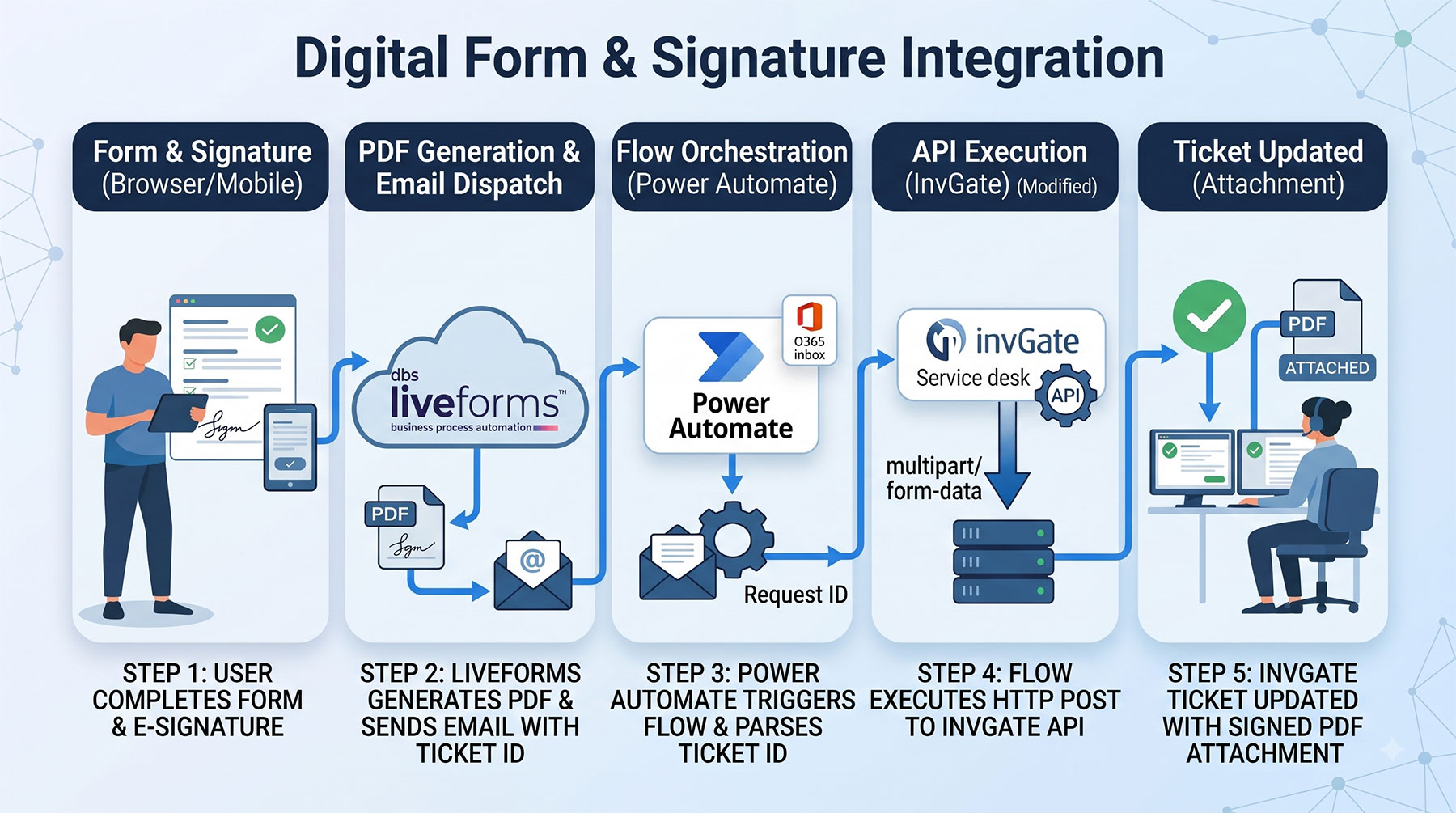
How the Workflow Operates:
- Form Completion & E-Signature: The user fills out and signs the digital form in dbs LiveForms™ on any mobile device or desktop browser.
- Automated Document Generation: LiveForms instantly generates a compiled PDF with embedded e-signatures and sends it to a designated Office 365 inbox. The subject line is automatically formatted with the ticket reference:
SIGNED FORM – Request [Ticket_ID] - Power Automate Orchestration: The incoming email triggers a Power Automate flow that reads the subject line, parses out the exact ticket Request ID, and grabs the attached PDF.
- RESTful API Execution: Power Automate executes a quick HTTP POST request using multipart/form-data directly against InvGate’s REST API endpoint.
- Automatic Ticket Indexing: The signed PDF is instantly attached to the matching InvGate ticket while preserving its original file name—completing the audit trail in real time.
Key Business Benefits
By connecting LiveForms to Power Automate, the organization achieved immediate operational gains:
- 100% Elimination of Manual Uploads: Users simply sign the form; the system handles the rest.
- Accelerated Ticket Processing: Support teams no longer wait around for manual attachments, drastically cutting down resolution times.
- Complete Compliance & Auditability: Every signed document is automatically linked to its exact ticket reference with zero risk of human error.
- Universal Applicability: A single Power Automate flow can process multiple distinct form types across different departments.
What Else Is Possible with LiveForms + Power Automate?
This integration isn’t limited to service desks like InvGate. Because dbs LiveForms™ supports standard REST APIs and web development standards, you can use Power Automate to route completed digital forms to virtually any platform:
- CRMs & ERPs: Update records or trigger workflows in Salesforce, SAP, or HubSpot.
- Cloud Storage: Archive signed contracts directly into organized SharePoint, Google Drive, or OneDrive folders.
- Approval Loops: Trigger sequential multi-level manager approvals via Microsoft Teams notifications.
Ready to Eliminate Paperwork Bottlenecks in Your Organization?
Discover how dbs LiveForms™ can digitize your forms and seamlessly connect with your existing software stack.

dbs Software & Services (dbs) is a long-standing provider of document management and process automation solutions for education and business, and the exclusive provider of Tessi Docubase® in North America.
Tessi Docubase® is an enterprise-grade modular, secure, and easy-to-use document management system that seamlessly integrates with Business Information Systems. Its secure architecture and a broad range of features make it the perfect solution for a wide range of enterprises and use cases.
dbs LiveForms, is a low-code Business Process Automation platform. Its sole focus is simplifying complex processes by automating repetitive steps – from data capture to alerts, notifications, email confirmations, and everything in between quickly, without involving a programmer.
dbs eSign is a cloud-based electronic signature solution that allows users to manage the signing process for a document, from upload to signing and sealing, from any mobile device or computer.
Stay up to date with all our document management blogs and content by following us on LinkedIn

Leave A Comment